🌐 Data that helps you see the market
DestChart Research & Trading Analytics

Turn market data into a structured trading view.

DestChart combines market direction, relative strength, capital flow, volatility, volume and price structure. The tools below are designed to help traders filter markets, test a thesis and identify where further analysis may be worthwhile.

Core idea

One market, several independent lenses

No single indicator is treated as a complete trading decision. The value comes from comparing independent measures and looking for agreement, divergence and changes in market regime.

FX & Crypto Synthetic Index - trading-focused version β†’

Aggregated volume across the FX Synthetic Index and Crypto Synthetic Index provides insight into market accumulation, shifts in activity, and potential reversal zones.

Direction

FX Synthetic Index + Delta Volume

A broad view of the FX market that combines synthetic market direction with participation and cumulative volume pressure.

Broad-market direction
Participation confirmation
Momentum divergence
H1 and D1 context
Useful when: you want to know whether a move in one pair is supported by the wider FX market.
Open FX Synthetic Index β†’
Relative strength

Currency Strength Index

Ranks the relative behaviour of major currencies across the FX basket, helping separate strong currencies from weak ones before choosing a pair.

Leadership changes
Strong-vs-weak pairing
Cross-market comparison
Directional filter
Useful when: pair selection should follow currency strength rather than a single chart setup.
Open Currency Strength β†’
Continuous market monitoring

Keep the market state visible while you trade

Charts are ideal for studying an individual setup. Dashboards solve a different problem: they keep the broader market environment visible without forcing you to repeatedly open and compare many separate instruments. A dedicated DestChart dashboard can stay on a second monitor during the trading session as a live market context screen.

FX Implied Trading Zone example showing historical level reactions
Market awareness

A dashboard is not another entry signal

Its value is continuous awareness. While you work with an individual FX or crypto chart, the dashboard keeps the wider risk environment, market leadership and important changes in view.

Practical use: keep one dashboard open throughout the session and use it as a background market filter. When the broader environment changes, you see the change without rebuilding the analysis from scratch.

This can help reduce tunnel vision: a technically attractive setup can be viewed alongside the condition of the wider market before additional analysis or risk is considered.

Open DestChart market dashboards β†’
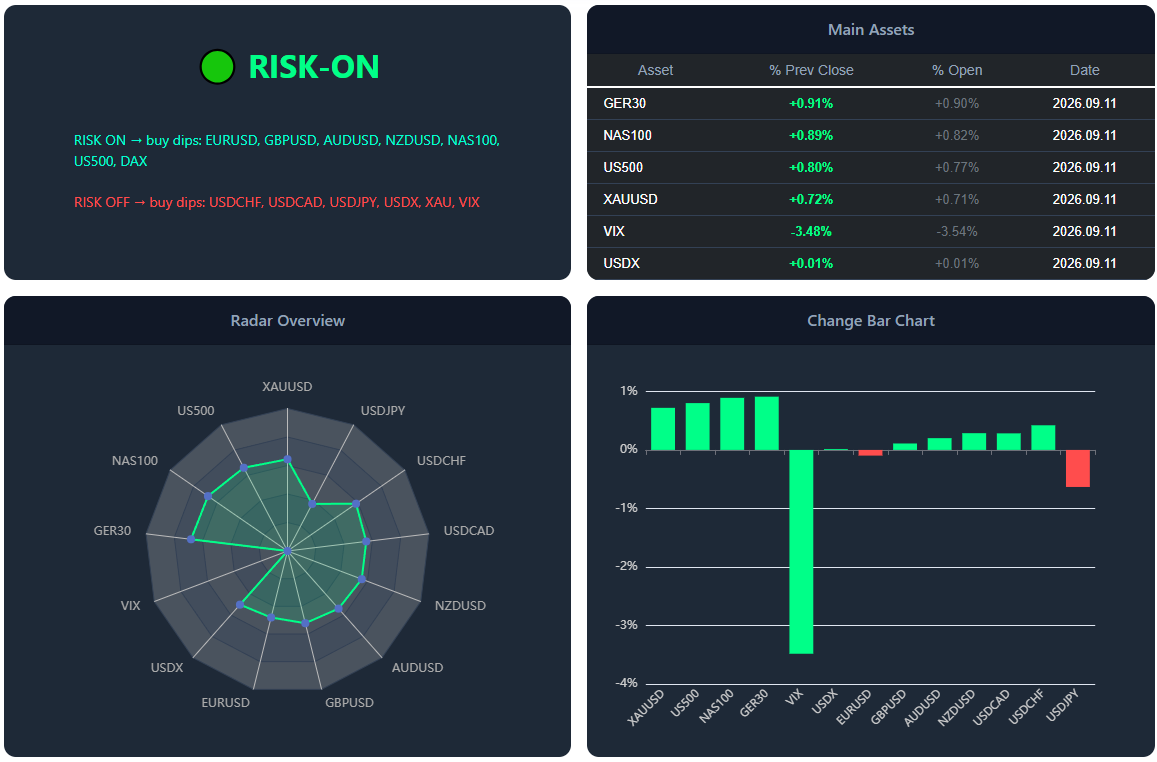
Global risk

ICT Market Risk Dashboard

A compact view of major cross-market benchmarks designed to keep the broader risk environment visible during the session.

Keep it on screen when: you want FX decisions to remain connected to changes in equities, volatility, gold and the U.S. dollar rather than analysing a currency pair in isolation.
View ICT Risk Dashboard β†’
Crypto risk

Crypto Market Risk Dashboard

Tracks the condition of leading crypto assets in one view, making it easier to see whether strength or weakness is broad across the market.

Keep it on screen when: you trade individual coins but want a continuous reference for the wider crypto risk regime.
View Crypto Risk Dashboard β†’
USD context

USDX Market Risk Dashboard

Maintains a focused view of U.S. dollar conditions so that changes in dollar pressure can be compared with the FX pair currently being traded.

Keep it on screen when: USD exposure is central to the session and you need broader dollar context beside the execution chart.
View USDX Risk Dashboard β†’
Multi-chart monitor

FX Mini Dashboard

Brings multiple FX markets into a compact monitoring layout. It is useful for watching several pairs at once without filling the workspace with full-size charts.

Keep it on screen when: you are waiting for opportunities across a watchlist and want to notice changing conditions before opening a detailed chart.
Open FX Mini Dashboard β†’
Trading zones

FX Implied Trading Zone

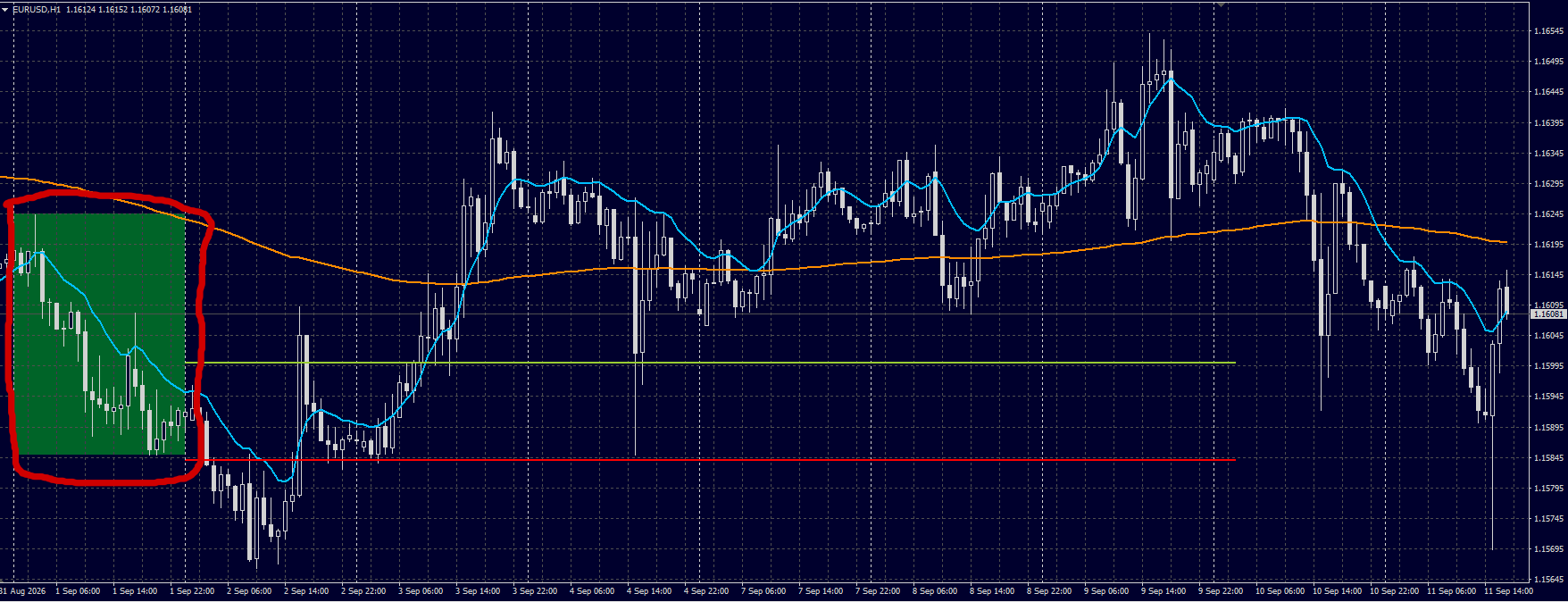
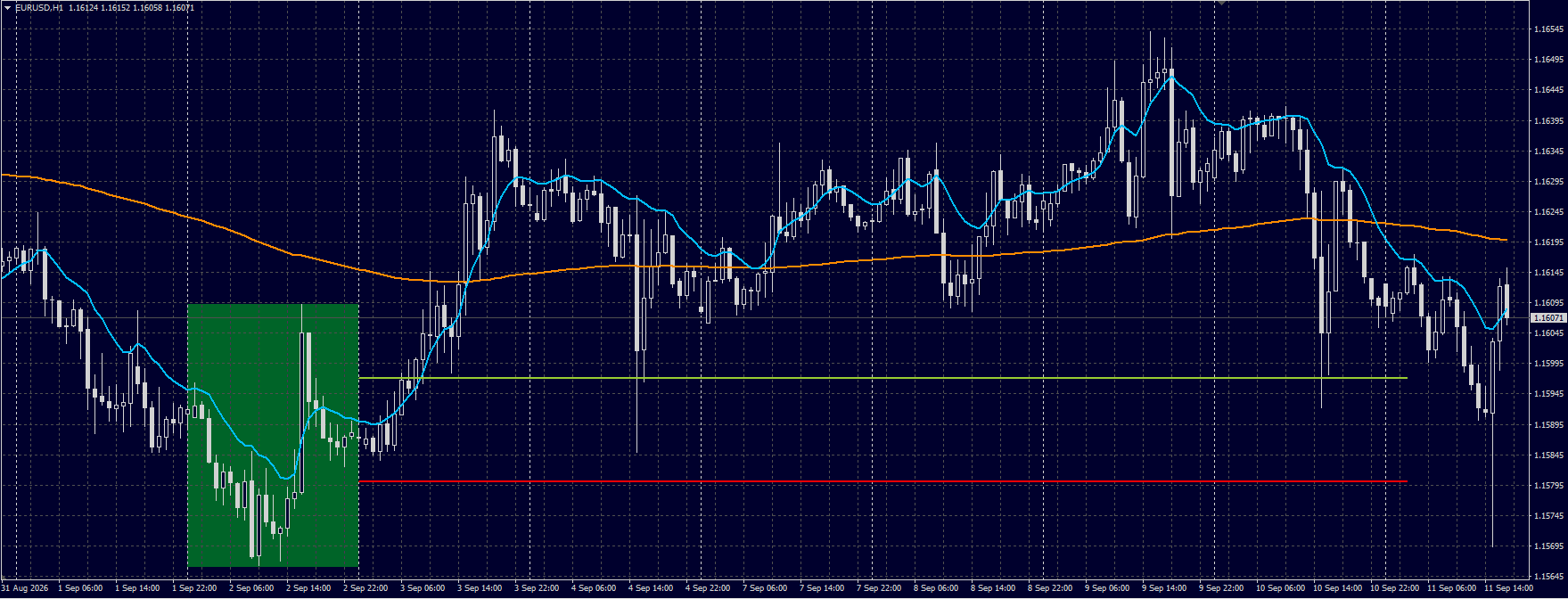
A practical price-reference table for major FX pairs, designed to highlight session zones that can remain relevant as price develops. The chart example below shows how these published levels interacted with subsequent market movement.

FX Implied Trading Zone example showing historical level reactions FX Implied Trading Zone example showing historical level reactions
Observed price reaction

Levels traders can verify on the chart

The FX Implied Trading Zone provides clearly defined High and Low reference levels for major currency pairs. Instead of presenting a retrospective signal, the table gives traders objective price areas that can be monitored as the session develops.

Why the chart matters: historical examples let visitors compare published levels with actual price behaviour and judge their practical relevance for themselves.

These areas can be used as context for reactions, tests, breaks and changes in directional behaviour. Previous zones may also remain useful reference points when price revisits them.

Open live FX Implied Trading Zone β†’
Capital flow

See where relative pressure is moving

Flow analysis converts relationships between currencies into a network view. It is useful for spotting leadership, weakness and unusually large differences between currencies.

Forex Flow β€” live DestChart componentRelative flow model β€’ data availability depends on the live API
Flow map

Forex Flow PRO

Transforms weighted, ATR-adjusted currency strength into directional links between currencies. Larger differences create stronger flow relationships.

Look for: persistent flow toward stronger currencies and unusually wide strength gaps.
View on DestChart β†’
USD research

USD Flow Map & Dollar Pressure

Use USD-specific tools to distinguish broad dollar pressure from moves driven mainly by the other currency in a pair.

Look for: agreement across major USD pairs, or divergence that points to exceptional relative strength.
Open Dollar Pressure β†’
Volatility

Find where the market is actually moving

Volatility tools help separate quiet markets from expanding ones and give context for stop distance, breakout conditions and strategy selection.

Scanner

FX Volatility Treemap

Compares short-term ATR with longer-term ATR and normalizes current movement by price. This makes it easier to find pairs with expanding activity.

ATR % of price
Expansion ratio
1H / 4H / 1D
Fast market scan
Useful when: you want to reduce a large watchlist to markets with meaningful current movement.
Open FX Volatility β†’
Trend filter

FX EMA Trinity MTF

Places multiple trend horizons into one view so short-, medium- and higher-timeframe direction can be checked before acting on a lower-timeframe setup.

Look for: alignment for cleaner trend conditions; compression and disagreement for less certain structure.
Open EMA Trinity MTF β†’
Price structure

Move from market selection to trade location

Once direction and regime are understood, structure tools help identify where price is balanced, displaced or trading near areas that deserve closer attention.

Imbalance

FX Imbalance Scanner

Highlights areas where price moved with pronounced one-sided displacement. The scanner makes it possible to locate these conditions across several FX instruments.

H1 structure
H4 structure
Displacement areas
Watchlist filtering
Useful when: the directional thesis is already formed and you need a more precise area to investigate.
Open FX Imbalance H1 β†’
Relative market

DXY Gravity

Places FX behaviour in the context of the U.S. Dollar Index, helping traders compare the individual pair trend with the broader dollar environment.

Look for: confirmation between the pair and DXY, or divergence that suggests relative strength in the non-USD currency.
Open DXY Gravity β†’
Confirmation

Use composite tables as a final cross-check

Composite models are most useful after a thesis already exists. They provide a compact way to compare several market inputs rather than replacing risk management or independent analysis.

Derivatives

FX Option Bias

A compact call/put bias view designed to show directional options positioning across the monitored FX universe.

Useful when: you want a derivatives-based cross-check against a price, flow or trend thesis.
Open FX Option Bias β†’
Composite matrix

FX Warrant Matrix

A table-oriented view for comparing several FX instruments and quickly identifying where the model shows stronger or weaker alignment.

Useful when: comparing candidates after the broader market, volatility and structure filters have already been applied.
Open Warrant Matrix β†’
Practical workflow

A repeatable way to use DestChart

The tools become more useful when they are applied in a consistent orderβ€”from market regime to trade location and final confirmation.

01

Market regime

Start with risk dashboards and synthetic indexes. Is the market directional, mixed or unstable?

02

Relative strength

Identify strong and weak currencies instead of choosing a pair from price action alone.

03

Capital flow

Check whether the flow model supports the same relative-strength relationship.

04

Volatility

Confirm that the selected market has enough current movement for the intended setup.

05

Trend alignment

Use EMA MTF and broader USD context to check higher-timeframe agreement.

06

Price structure

Locate imbalance or other relevant areas rather than entering only because direction is clear.

07

Cross-check

Compare the thesis with options bias or the composite matrix for additional confirmation.

08

Risk decision

Define invalidation and risk independently. Analytics improve context; they do not remove uncertainty.

Quick reference

Which tool answers which question?

Trading questionDestChart toolPrimary use
What is the broad market direction?FX Synthetic IndexMarket direction and divergence
Which currencies are strongest / weakest?Currency Strength IndexPair selection
What is changing across the wider market?Risk Dashboards / FX Mini DashboardContinuous market monitoring
Where are the current FX reference zones?FX Implied Trading ZonePrice levels and reaction areas
Where is relative pressure moving?Forex Flow PROCapital-flow confirmation
Which pairs are becoming active?FX VolatilityVolatility filtering
Are timeframes aligned?EMA Trinity MTFTrend confirmation
Is this a broad USD move?Dollar Pressure / DXY GravityUSD context
Where did price displace sharply?FX ImbalancePrice-location research
Does a composite model agree?Option Bias / Warrant MatrixFinal cross-check
Important: DestChart indicators are analytical and research tools, not guarantees of future price movement. Historical relationships can change. Use independent risk management and treat every model output as one input in a broader decision process.
DestChart
info@destchart.com
x